
Transparent Takeover: Seamlessly Unifying Your Project Context
In the previous post, we talked about the big vision of making Mantra a comprehensive local MCP Hub. It's a great goal, but when it comes to actually running it, the biggest concern for everyone is the migration cost:
"I already have a dozen MCP servers configured in Cursor. Do I have to move them all manually?" "Will Mantra mess up my project configuration files? What if I want to switch back?"
These worries are natural. As developers, we hate the "migration burden" that tools often bring. So, Mantra developed a Transparent Takeover mechanism.
In this article, we'll break down how Mantra achieves a "frictionless" upgrade through three steps: Discovery -> Import -> Redirect.
I. Step One: Global Discovery
To deal with fragmentation, you first have to know what you're dealing with.
Mantra runs a Configuration Scanning Module (Scanner). When you drop a project directory into Mantra, it takes a look for itself.
 Figure 1: Mantra Scanner searching for configuration "dialects" across the board
1. Identifying Configuration "Dialects"
The current MCP configuration landscape is a bit of a mess, with every tool having its own ideas:
- Gemini CLI stores configuration in standard JSON, usually at
~/.gemini/settings.json. - Cursor prefers JSON with comments (JSONC), and the config might be buried in global storage or the project root.
- Claude Code has its own
.claude.jsonstructure.
Mantra's Scanner understands these "dialects." It can automatically find files like ~/.claude.json and extract the mcpServers blocks, converting them into Mantra's internal standard model (based on the McpRegistry data structure in our Rust backend).
2. Multi-level Scope Positioning
The Scanner follows a hierarchy for recursive scanning:
- Global: Configuration in the user's home directory.
- Workspace: Identified multi-project workspaces.
- Project: The active project directory (e.g.,
.cursor/mcp.json).
Through scanning, Mantra maps out a complete "configuration map," identifying which services are globally shared and which are private to specific projects.
II. Step Two: Conflict Resolution and Semantic Deduplication (Import)
Once the scan is done, the next step is "merging" these configurations. The core challenge here is deduplication.
If you have a postgres service in Cursor and another postgres service in Gemini CLI, how does Mantra handle it?
Mantra doesn't just look at the name; it uses a Semantic Fingerprint of Command + Args. As long as the execution command and core parameters match, the Hub identifies them as the same service instance, avoiding redundant startups.
At this stage, Mantra's UI shows a clear list for you to confirm:
- ✅ Identified 3 global services (Postgres, Slack, Filesystem)
- ⚠️ Identified 1 project conflict: Cursor and Gemini have inconsistent parameters for Postgres. Which one should we keep?
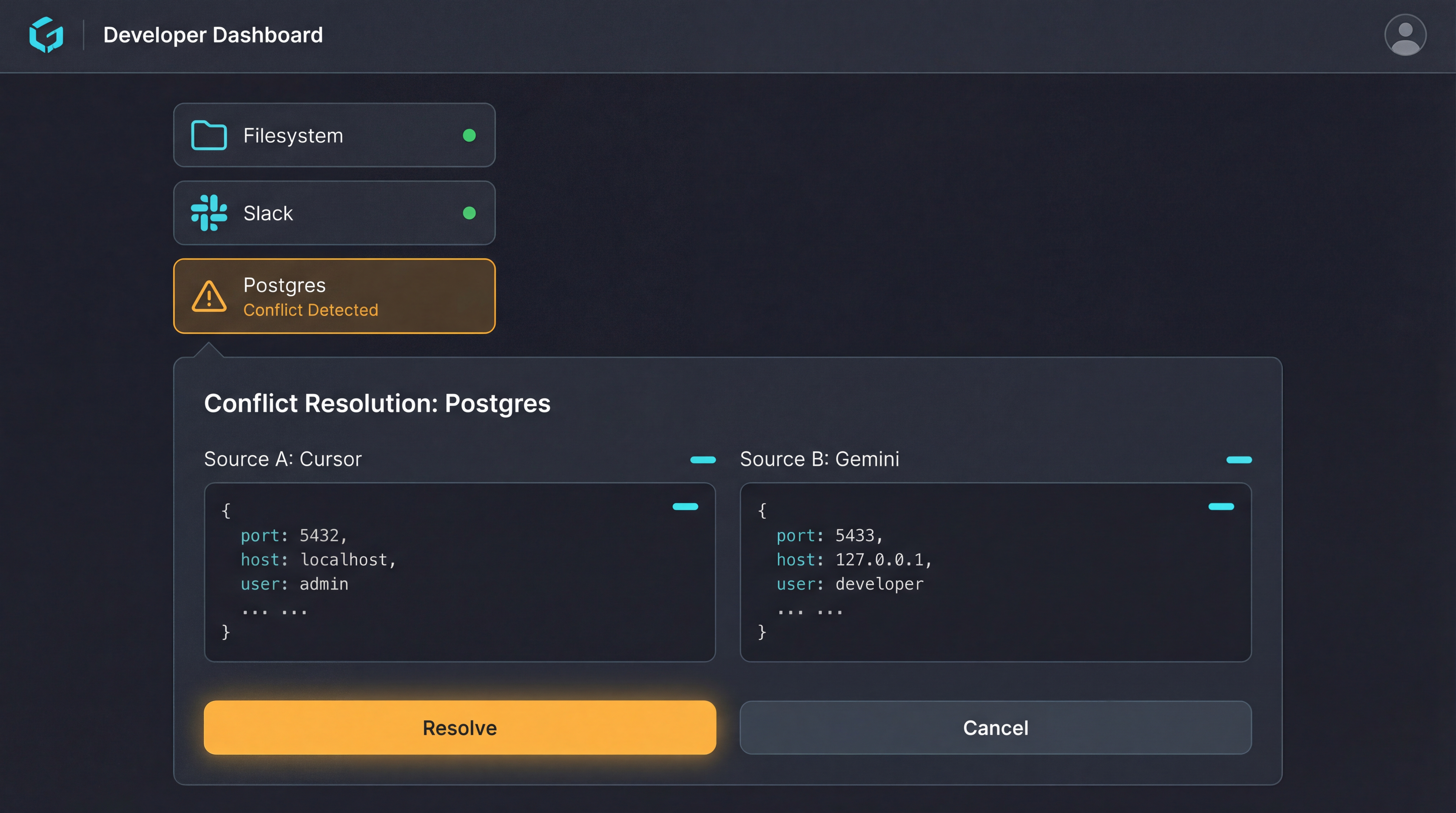 Figure 2: Mantra helping you clear up the mess
Once you confirm, these scattered configurations are officially moved to Mantra's storage, and the Hub takes over lifecycle management from then on.
III. Step Three: Redirection — Implementing the Transparent Proxy (Redirect)
This is the cleverest part of the process and the core of the "frictionless" upgrade.
In a traditional migration, you might have to manually change every tool's config. But in Mantra's takeover process, we play a little trick with "redirection."
Take Cursor as an example. When you click "Confirm Takeover," Mantra works quietly in the background:
- Auto Backup: It first backs up your original
.cursor/mcp.json, so you have a way back if you ever want to change your mind. - Transparent Proxy Rewrite: It rewrites the JSON. The command that originally pointed to the real server is replaced with Mantra's local proxy command:
// Fragment of .cursor/mcp.json after takeover
"mcpServers": {
  "postgres": {
    "command": "mantra-proxy",
    "args": ["--hub", "ws://localhost:3000/mcp/postgres"]
  }
}
How It Works
Cursor has no idea anything has changed; it still thinks it launched a normal local process (mantra-proxy). But this proxy process is actually a "messenger": its only job is to tunnel all traffic to the Mantra main process.
At this point, the Mantra Hub acts as a transparent middleman:
- Cursor keeps working as usual, with zero changes to your habits.
- Postgres Server is still running locally.
- Mantra sits in the middle, managing process persistence and adding audit logging that wasn't possible before.
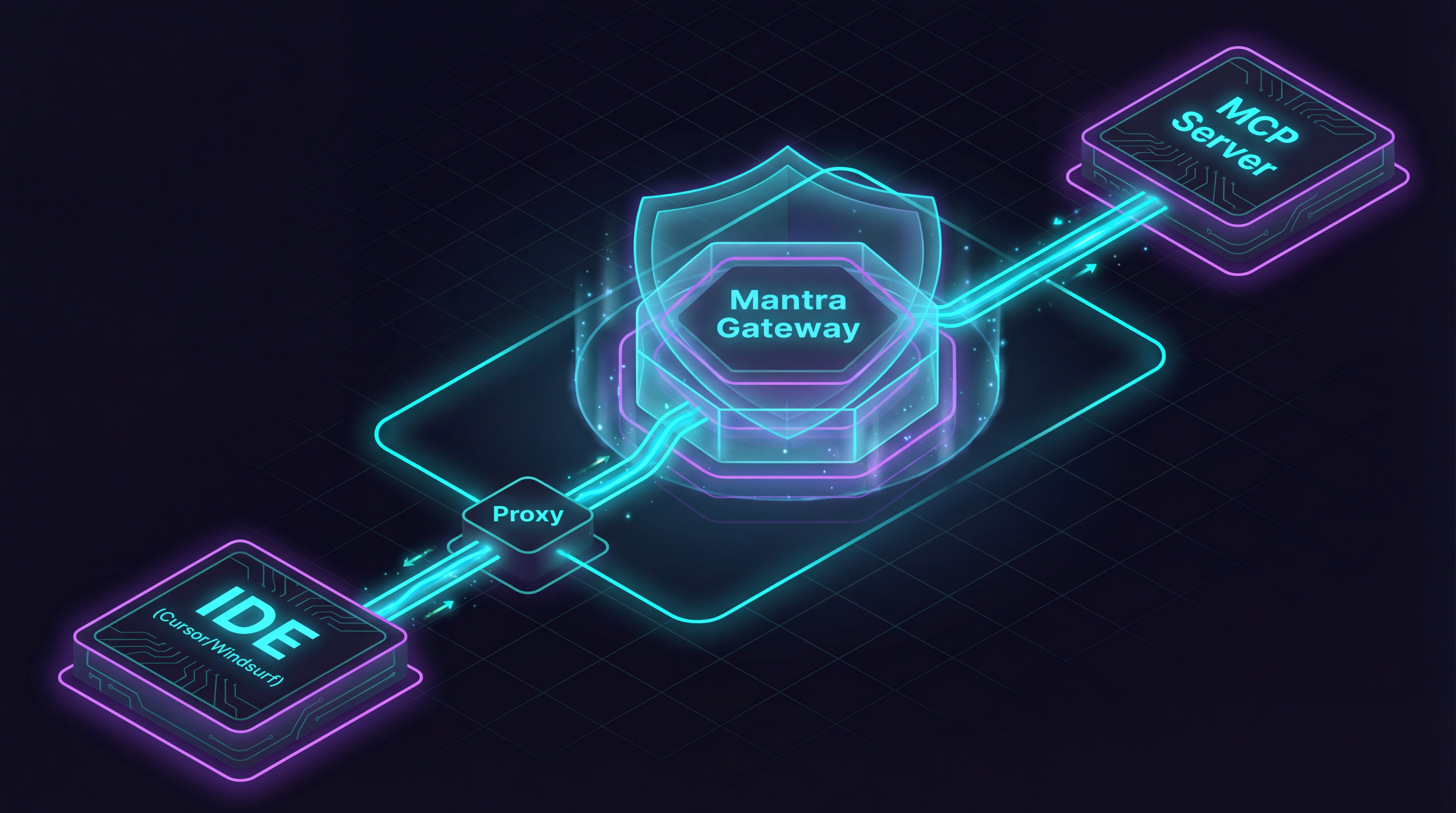 Figure 3: Mantra Transparent Takeover Traffic Schematic
This is Transparent Takeover: your IDE doesn't change, your habits don't change, but the underlying connection architecture has been upgraded from "guerrilla" to "regular army."
IV. Leave Whenever You Want: The Eject Button
We understand that developers naturally dislike words like "takeover." What if you feel the Hub is becoming a burden, or you just want to go back to the way things were?
Mantra has an Eject (Restore) button ready.
 Figure 4: Leave whenever you want, restore your dev environment with one click
Because it kept a backup during takeover, as soon as you hit restore, Mantra instantly:
- Stops all proxy processes.
- Restores configuration files like
.cursor/mcp.json. - Re-enables your original startup commands.
Your environment will return to its original state as if nothing ever happened. This "way out" is a prerequisite for our design—only by letting you leave comfortably will you be willing to try it.
V. Conclusion: Making the Hub Invisible
A good tool should be something you don't even feel is there when you're using it.
Through these three steps—Discovery -> Import -> Redirect—Mantra gathers scattered configurations into a global MCP Hub. You no longer need to mess with each tool's configuration; you just need to take a look at the Hub.
At this stage, traffic takeover is complete. So, now that we have the traffic in our hands, can we do something even more advanced?
In the next article, we'll talk about "Granular Governance": How to restrict AI to only read specific tables? How to assign different permissions to different assistants?
Stay tuned: "Mantra MCP Series (3): Beyond On and Off, Designing a Granular AI Governance System.".